
Grow K220+R502-a DC10-24V Two Relay Administrator | RFQ Sourcing Details
Access Control Systems · 200 Sensing array 192*192 pixel Working current 20mA Standby current Typical touch standby · Quote on request
This is a product procurement detail page: check specs, images, category context and related sourcing paths before sending an RFQ.
Product specs
Buyer's Digest
Use this page as a product-first sourcing checkpoint before sending an RFQ. Category: Access Control Systems. Confirm application fit, capacity, materials, destination, lead time and compliance requirements before comparing suppliers.
Original product description
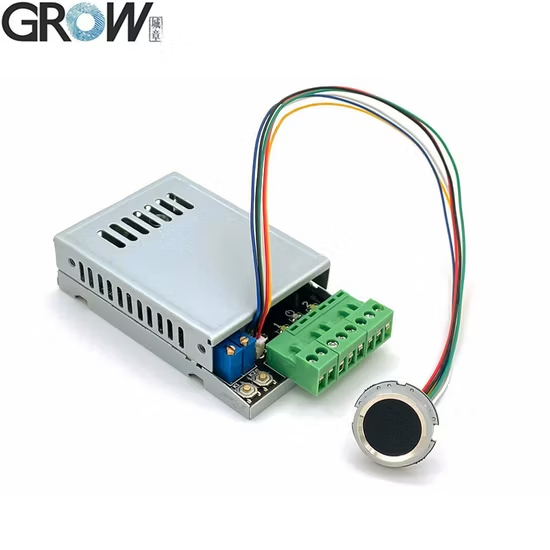
Technical Parameters ·P1: Power supply:DC10V--30V ·P2: Output:Relay(Max.
current: 10A) ·P3: MX 1.0-6P Fingerprint Module (can connect R502,R502-A,R503) ·P4: MX 1.25-6P Fingerprint Module (can connect R300,R301T,R302,R303,R303T,R305,R306,R307,R501) ·Standby current:6mA(DC12V) ·Fingerprint capacity:300 pieces Operation Instruction 1.SET Button(K1-K2) 1.1 Register Administrator Fingerprint:Press SET button shortly,system in administrator register status and blue indicator light flash fast, put the same finger with multiple times in fingerprint collection area until hearing music means fingerprint register successful.
Fingerprint can be registered continuously. If no need for adding fingerprint, waiting a few seconds to exit.
1.2 Delete Fingerprint: 1.2.1 Delete single relay position fingerprints:Long press the corresponding SET button,blue indicator light flash fast,hear long "Di" beep, loosen the finger, the relay indicator light on and hear music, means this location of the admin and user fingerprints are deleted;1.2.2 Delete all relay position fingerprints(Back to factory default):Long press any SET button to hear long "Di" beep twice, loosen the finger,all indicator light on, means initialization operation successful,back to factory default.
2.Register User Fingerprint:Press the administrator fingerprint about 10 seconds until hear the music and blue indicator light flash fast,means can add user fingerprint. Put the same user finger with multiple times in fingerprint collection area until hearing music means fingerprint register successful.
Fingerprint can be registered continuously. If no need for adding fingerprint, waiting a few seconds to exit.
(Note:The storage location of the user's fingerprint depends on the storage location of the administrator's fingerprint;If the administrator's fingerprint is stored in No.1 and No.2 at the same time, the user's fingerprint will be stored in No.1 by default.) 3.Delete User Fingerprint:Press the administrator fingerprint about 20 seconds until hear "Di-" and music,means user fingerprints at this location are deleted.
(Note:The delete location of the user's fingerprint depends on the storage location of the administrator's fingerprint.
If the administrator's fingerprint is stored in No.1 and No.2 at the same time, the user fingerprints in No.1 will be deleted by default.) 4.Set Relay Time:Rotate S1 or S2 to set the closing time of the relay from 0.5 to 60 seconds.
When over 60 seconds, it will in the normally open normally closed state,relay operated when fingerprint passed, and then relay released when fingerprint passed again, relay operated and released circularly. The relay is , switch signal, no voltage output.
5.Usage:Press the finger,the relay closes after the fingerprint passes, and the closing time is determined by S1 or S2. Note: 1.
All indicator lights are off in standby state, and the lights are on in working state;2.If want to close the module indicator light when in the normally open mode, long press any SET button to hear long "Di" beep three times. Repeat this action to open.
K220 can be used together with R502,R502-A,R502-AW,R503 fingerprint module R502-A Specifications Model R502-A Type Capacitive Fingerprint Module Interface UART(TTL) Resolution 508 DPI Voltage DC 3.3V Fingerprint Capacity 200 Sensing array 192*192 pixel Working current 20mA Standby current Typical touch standby voltage: 3.3V, Average current: 2uA Fingerprint module external size Diameter 22 (mm) Fingerprint module inner size Diameter 19.5 (mm) Fingerprint module height 5 (mm) Effective collection area Diameter 15.5 (mm) Connector MX1.0-6.
Pin LED Control YES LED Color Purple and Blue and Red Scanning Speed < 0.2 second Verification Speed < 0.3 second Matching Method 1:1;1:N FRR ≤1% FAR ≤0.001% Work environment -20C ---60C Work Humidity 10-85% Anti-static capacity 15KV Abrasive resistance intensity 1 million times Communications baud rate (UART): (9600 × N) bps where N = 1 ~ 12(defau
Grow | Applications and Buyer Notes
Grow is organized as a sourcing-ready Access Control Systems reference. The page combines visible product or company data with structured procurement cues so buyers can compare application fit, specifications, quantity, quality requirements and lead-time quest
Applications
- Initial shortlist building for related product or supplier options.
- Specification and application fit review before bulk purchasing.
- Category, keyword and detail-page comparison before sending an RFQ.
Key specifications
- Unit
- setBased on visible page data; confirm exact value in the RFQ.
- Capacity
- 200 Sensing array 192*192 pixel Working current 20mA Standby current Typical touBased on visible page data; confirm exact value in the RFQ.
- Interface
- UART(TTL) Resolution 508 DPIBased on visible page data; confirm exact value in the RFQ.
- Specifications
- Model R502Based on visible page data; confirm exact value in the RFQ.
- Type
- Capacitive Fingerprint ModuleBased on visible page data; confirm exact value in the RFQ.
- Voltage
- DC 3.3V FingerprintBased on visible page data; confirm exact value in the RFQ.
Buyer tips
- State quantity range and split-delivery needs before price comparison.
- Add certification, material or inspection standards when they affect acceptance.
- For time-sensitive projects, include target arrival date and destination.
- For special applications, describe operating condition, installation environment and duty cycle.
FAQ
What should buyers confirm first?
Confirm application, specification, quantity, destination and lead-time requirements before comparing offers.
Can buyers inquire when specs are incomplete?
Yes. Add model, material, size, use case and inspection needs in the RFQ to make replies comparable.
How should this listing be evaluated?
Check title, category, specifications and related keywords against the actual sourcing requirement.
Source mix: ugc
Key specifications
Product sourcing keywords
These terms come from the title, visible copy and specifications, and link into matching aggregate pages.
Continue from this detail page into sourcing structure
These links connect the detail page back to category hubs, procurement aggregates and knowledge pages so new inventory is not isolated.
This URL was refreshed but still has no Googlebot evidence, so it is promoted into shared internal links for crawl discovery.
Internal sourcing path 1000 Fingerprint And 10000 Id Card Waterproof Access Control System Ma300 Fingerprint And AccessThis URL was refreshed but still has no Googlebot evidence, so it is promoted into shared internal links for crawl discovery.
Internal sourcing path Procurement sourcing pathThis URL was refreshed but still has no Googlebot evidence, so it is promoted into shared internal links for crawl discovery.
Internal sourcing path Alarms And Perimeter Security categoryThis URL was refreshed but still has no Googlebot evidence, so it is promoted into shared internal links for crawl discovery.
Internal sourcing path Access Control Systems categoryThis URL was refreshed but still has no Googlebot evidence, so it is promoted into shared internal links for crawl discovery.
Internal sourcing path Cctv And Video Surveillance categoryThis URL was refreshed but still has no Googlebot evidence, so it is promoted into shared internal links for crawl discovery.
Internal sourcing path Turnstiles Locks And Intercoms categoryThis URL was refreshed but still has no Googlebot evidence, so it is promoted into shared internal links for crawl discovery.
Internal sourcing path CompanyThis URL was refreshed but still has no Googlebot evidence, so it is promoted into shared internal links for crawl discovery.
Internal sourcing path 10000mah Power Bank With Motion Detection 1080p Hd 2 4g Wifi Home Security CameraThis URL was refreshed but still has no Googlebot evidence, so it is promoted into shared internal links for crawl discovery.
Internal sourcing path Access Control Suppliers sourcing pathThis URL was refreshed but still has no Googlebot evidence, so it is promoted into shared internal links for crawl discovery.
Internal sourcing path 2mp Cctv Surveillance 57x 1080p Hd Mipi Ois 850mm Ai Isp Zoom 1 1 8 Camera Mipi Ai Isp Camera AndThis URL was refreshed but still has no Googlebot evidence, so it is promoted into shared internal links for crawl discovery.
Internal sourcing path 55w Phs 11t Hand Disinfection Turnstile Station Automatic Grade AutomaticThis URL was refreshed but still has no Googlebot evidence, so it is promoted into shared internal links for crawl discovery.
Internal sourcing path 8 Inch Android Face Liveness Detection Access Control And Attendance TerminalThis URL was refreshed but still has no Googlebot evidence, so it is promoted into shared internal links for crawl discovery.
Internal sourcing path Cctv Camera Manufacturers sourcing pathThis URL was refreshed but still has no Googlebot evidence, so it is promoted into shared internal links for crawl discovery.
 RS-A102 Fingerprint Time Attendance and Networked Access ControllerRequest Quote
 GT210 Fingerprint Time Attendance and Door Access Control Terminal with WiFi/GPRS and Backup BatteryRequest Quote
 5-Inch Facial and Fingerprint Access Control & Time Attendance TerminalRequest Quote
 NF-KT56 Visible-Light Face, Fingerprint, Card and Password Access Control TerminalRequest Quote
 NF-T23 All-in-One Fingerprint, Card and Password Access ControllerRequest Quote
 TF30 Smart Fingerprint, IC Card and Password Access Control Device with 1.77-Inch DisplayRequest Quote
AccessShieldHub related sourcing paths
AccessShieldHub procurement phrases
AccessShieldHub related product samples
TF30 Access control waterproof dual-bandfingerprint device with screen Product Name: Smart Fingerprint Access Control De...
Access Control Systems Outdoor Waterproof Fingerprint Access Control System All-in-One Smart Electronic Password Card SwipeTF30 Access control waterproof dual-bandfingerprint device with screen Product Name: Smart Fingerprint Access Control De...
Access Control Systems Streamlined Turnstile and Swing Gate Access Control System for Efficiency - Access Control System anSwing Turnstile Gate SJS-TDB01 1. This access device uses ID card, face, and fingerprint recognition for passage. 2. It ...
Access Control Systems All-in-One Facial Recognition Access Control System, Waterproof, Supports Facial Scanning, FingerpriEnhanced Visible Light Facial Recognition Better hygiene with touchless biometric authentication, masked individual iden...
Access Control Systems S4a 10 Floors Security Cabinet Locker Controller System Lift and Elevator Controller Access ControlS4A 10 Floors Security Cabinet Locker Controller System Lift and Elevator Controller Access Control Board 1-10floors Ele...
Access Control Systems Waterproof IP66 3D Face Fingerprint Password RFID Card Access Control System for HoKOTONLINK AC54 WiFi Smart Door Lock with 3D Face Recognition, Fingerprint & App Control-IP66 Waterproof Access Control S...